Gemini AI Photo Editing: Top 30 Slash Commands से फोटो एडिट करें
Written By Shamin BanoPublished: 20 November 2026 • 11:33 PM IST
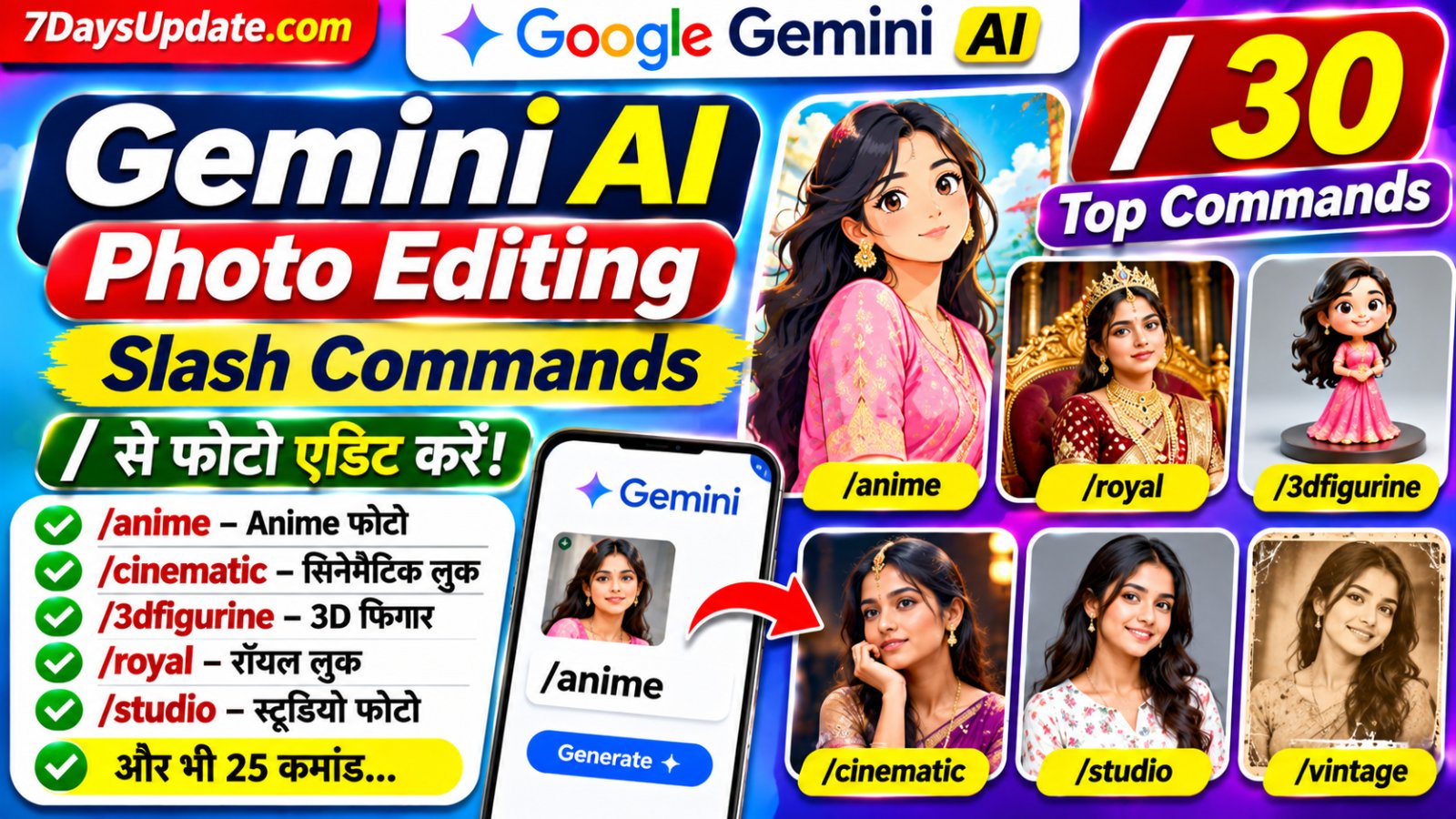
Gemini AI Photo Editing: Top 30 Slash Commands से फोटो एडिट करेंGemini Photo Editing का इस्तेमाल करके अब अपनी साधारण फोटो को Anime, Cinematic, Royal Look, 3D Figurine, Professional Portrait और कई दूसरे creative styles में बदल सकते हैं। सोशल मीडिया पर AI Photo Editing का ट्रेंड तेजी से लोकप्रिय हो रहा है। इसमें कुछ लोग फोटो के साथ छोटे slash-style words जैसे /anime, /cinematic और /3dfigurine लिखकर अपनी फोटो का नया लुक तैयार कर रहे हैं। अगर आप भी अपनी फोटो को बिना किसी complicated editing software के नया स्टाइल देना चाहते हैं, तो इस लेख में दिए गए 30 Gemini Slash-Style Commands और Copy-Paste Prompts इस्तेमाल कर सकते हैं। आपको बस अपनी फोटो Gemini में upload करनी है और पसंद का command तथा उसका prompt भेजना है। जरूरी जानकारी: ये 30 commands Google Gemini के आधिकारिक built-in slash commands नहीं हैं। ये creative prompt shortcuts हैं। Gemini में केवल /anime लिखने से हर बार निश्चित परिणाम मिलेगा, इसकी गारंटी नहीं है। इसलिए बेहतर रिजल्ट के लिए command के साथ दिया गया पूरा prompt भी इस्तेमाल करें। Gemini AI Photo Editing क्या है?Gemini AI Photo Editing Google Gemini की image generation और editing सुविधा है। इसमें आप अपनी मौजूदा फोटो upload करके AI को बता सकते हैं कि उसमें क्या बदलाव चाहिए। उदाहरण के लिए कपड़े बदलना, background बदलना, cartoon look बनाना, lighting सुधारना या फोटो को किसी artistic style में बदलना। Gemini का Nano Banana image model फोटो को edit करने और नए visual styles बनाने में मदद करता है। आप एक फोटो को reference बनाकर उसके आधार पर नया image भी तैयार कर सकते हैं। Gemini में Slash Commands कैसे इस्तेमाल करें?नीचे दिए गए slash commands को इस्तेमाल करने के लिए इन आसान Steps को follow करें: Step 1: Gemini App खोलेंअपने मोबाइल में Google Gemini App खोलें या आधिकारिक वेबसाइट https://gemini.google.com/ पर जाएं। अपने Google Account से login करें। Step 2: अपनी Photo Upload करेंChat Box के पास मौजूद Image या Plus विकल्प पर टैप करें। Gallery से वह फोटो चुनें जिसे आप edit करना चाहते हैं। साफ और अच्छी रोशनी वाली फोटो इस्तेमाल करने से बेहतर परिणाम मिल सकते हैं। Step 3: Slash Command चुनेंइस पोस्ट में दिए गए 30 commands में से अपनी पसंद का एक command चुनें। उदाहरण के लिए /anime या /cinematic। इसके साथ संबंधित पूरा prompt भी कॉपी करें। Step 4: Prompt Send करेंअपनी uploaded फोटो के साथ command और prompt को Chat Box में paste करके Send करें। Gemini आपके निर्देशों के अनुसार फोटो edit करने की कोशिश करेगा। Step 5: Photo Save करेंयदि परिणाम पसंद आए तो image को खोलकर Download या Save विकल्प से मोबाइल में सुरक्षित कर लें। यदि परिणाम सही नहीं आया है, तो Gemini को एक और स्पष्ट instruction देकर बदलाव करा सकते हैं। Top 30 Gemini AI Photo Editing Slash Commandsनीचे 30 creative slash-style commands दिए गए हैं। हर command के साथ एक prompt भी है। आप इन्हें सीधे कॉपी करके अपनी फोटो के साथ इस्तेमाल कर सकते हैं। 1. /anime – Anime Cartoon Photoक्या करेगा: आपकी फोटो को Japanese Anime character जैसा look देने के लिए। Prompt: Transform the uploaded photo into a beautiful high-quality Japanese anime illustration. Keep the person's facial identity recognizable, with expressive eyes, detailed hair, vibrant colors and a beautiful anime background. 2. /3dfigurine – 3D Toy Figureक्या करेगा: फोटो को एक छोटे collectible 3D toy figure जैसा दिखाने के लिए। Prompt: Turn the person in the uploaded photo into a premium 3D collectible figurine. Preserve recognizable facial features, create realistic toy materials, detailed clothing and place the figurine on a stylish display base. 3. /cinematic – Cinematic Portraitक्या करेगा: फिल्म के पोस्टर जैसी lighting और dramatic look के लिए। Prompt: Transform this photo into a cinematic movie-style portrait. Add dramatic lighting, professional color grading, realistic shadows, beautiful depth of field and a premium film photography look. Keep the person's face recognizable. 4. /royal – Royal King Lookक्या करेगा: Royal dress और शाही background बनाने के लिए। Prompt: Transform the person into a royal king wearing an elegant traditional royal outfit with a luxurious palace background, beautiful golden lighting and premium cinematic photography. Preserve the original facial identity. 5. /princess – Princess Lookक्या करेगा: फोटो को खूबसूरत Princess style में बदलने के लिए। Prompt: Create an elegant princess-style portrait using the uploaded photo. Add a beautiful royal gown, a luxurious palace setting, delicate accessories and soft cinematic lighting while preserving the person's face. 6. /oldmoney – Old Money Aestheticक्या करेगा: Premium और classy fashion look बनाने के लिए। Prompt: Restyle this portrait into a sophisticated old-money aesthetic. Add elegant tailored clothing, a luxurious classic interior, subtle neutral colors and natural editorial photography. Keep the original face unchanged. 7. /vintage – Vintage Photographyक्या करेगा: पुरानी फिल्म और retro photo जैसा look देने के लिए। Prompt: Convert this photo into a beautiful vintage 1990s film photograph. Add warm faded colors, subtle film grain, soft highlights and authentic analog camera texture while preserving the subject's identity. 8. /cyberpunk – Cyberpunk Styleक्या करेगा: Neon lights और futuristic city वाला look। Prompt: Transform this portrait into a futuristic cyberpunk scene. Add neon blue and pink lights, a futuristic city background, dramatic reflections and high-detail cinematic styling. Preserve the person's recognizable face. 9. /professional – Professional Headshotक्या करेगा: LinkedIn और office profile जैसी फोटो। Prompt: Create a professional corporate headshot from this uploaded photo. Add a formal business outfit, clean studio lighting, a subtle office background and natural skin texture. Preserve the person's real facial identity. 10. /passport – Passport Style Photoक्या करेगा: साफ और formal ID-style portrait बनाने के लिए। Prompt: Create a clean passport-style portrait from the uploaded photo. Use a plain white background, front-facing neutral expression, even lighting and natural facial appearance. Do not change the person's identity. Follow the required country's photo specifications if provided. 11. /studio – Studio Photoshootक्या करेगा: Professional studio में खिंची फोटो जैसा look। Prompt: Turn this photo into a premium professional studio portrait. Add softbox lighting, a clean elegant backdrop, realistic skin details and professional portrait photography. 12. /wedding – Wedding Photoshootक्या करेगा: Wedding और pre-wedding जैसा फोटोशूट। Prompt: Transform this photo into an elegant wedding photoshoot. Add beautiful traditional wedding outfits, a decorated venue, warm fairy lights and romantic cinematic photography while keeping the faces recognizable. 13. /saree – Traditional Saree Lookक्या करेगा: Traditional saree outfit में नया look। Prompt: Change the outfit into an elegant traditional Indian saree with detailed fabric texture, tasteful jewelry and a beautiful traditional background. Preserve the person's face, pose and natural body proportions. 14. /suit – Formal Suit Lookक्या करेगा: Formal suit और business fashion style। Prompt: Replace the person's outfit with a perfectly tailored premium formal suit. Add a sophisticated modern office background, natural lighting and luxury fashion photography. Keep the face and pose unchanged. 15. /beach – Beach Photoshootक्या करेगा: समुद्र किनारे photoshoot जैसा background। Prompt: Place the person in a beautiful tropical beach photoshoot setting. Add a clear blue ocean, soft sunlight, natural shadows and realistic travel photography. Preserve the original face and appearance. 16. /snow – Snowfall Lookक्या करेगा: बर्फ और पहाड़ों के बीच फोटो। Prompt: Transform the background into a beautiful snowy mountain landscape. Add gentle snowfall, winter clothing appropriate to the scene and soft cinematic winter lighting. Keep the person's face recognizable. 17. /rain – Rainy Cinematic Lookक्या करेगा: बारिश और cinematic mood। Prompt: Create a cinematic rainy-day portrait. Add realistic raindrops, wet street reflections, moody lighting and a beautiful atmospheric background. Preserve the person's identity and natural facial details. 18. /newspaper – Newspaper Portraitक्या करेगा: Newspaper print और editorial effect। Prompt: Convert this portrait into a stylish black-and-white newspaper editorial illustration. Add realistic halftone printing texture, vintage paper details and high-contrast portrait styling. 19. /watercolor – Watercolor Paintingक्या करेगा: फोटो को watercolor painting में बदलने के लिए। Prompt: Recreate the uploaded photo as a beautiful watercolor painting. Use soft flowing colors, delicate brush textures, artistic paper details and preserve the person's recognizable features. 20. /oilpainting – Oil Paintingक्या करेगा: Classical oil painting जैसा look। Prompt: Transform this photo into a traditional fine-art oil painting. Add rich brush strokes, layered colors, detailed facial features and an elegant artistic composition. 21. /pixar – 3D Animated Characterक्या करेगा: Cute 3D animated movie जैसा character। Prompt: Reimagine the uploaded person as a charming high-quality 3D animated movie character. Add expressive eyes, detailed hair, soft cinematic lighting and a colorful environment while retaining recognizable features. 22. /comic – Comic Book Styleक्या करेगा: फोटो को comic book illustration में बदलने के लिए। Prompt: Turn this photo into a dynamic comic book illustration. Use bold outlines, dramatic shading, vibrant colors and detailed graphic-novel artwork while keeping the person's appearance recognizable. 23. /sketch – Pencil Sketchक्या करेगा: पेंसिल से बनाई हुई drawing जैसा look। Prompt: Convert the uploaded portrait into a highly detailed pencil sketch on textured white paper. Use realistic graphite shading, fine lines and natural facial proportions. 24. /glamour – Glamour Photoshootक्या करेगा: Fashion magazine जैसा glamour look। Prompt: Create a premium fashion glamour portrait from the uploaded photo. Add elegant styling, professional beauty lighting, refined colors and high-end magazine photography while preserving the subject's identity. 25. /fitness – Gym Fitness Lookक्या करेगा: Gym और fitness photoshoot style। Prompt: Transform this image into a professional fitness photoshoot. Add a modern gym background, athletic clothing, dramatic but natural lighting and realistic details. Maintain the person's actual body proportions. 26. /travel – Travel Photographyक्या करेगा: Travel blogger और tourist photoshoot जैसा look। Prompt: Turn this photo into a premium travel photography portrait. Place the person at a beautiful scenic destination with realistic natural lighting, vibrant scenery and professional travel magazine styling. 27. /bokeh – Blurred Backgroundक्या करेगा: Background blur करके subject को highlight करना। Prompt: Enhance this portrait with a beautiful professional background bokeh effect. Keep the person sharp and detailed, add soft circular background lights and realistic depth of field. 28. /glow – Soft Glow Effectक्या करेगा: Soft light और glowing portrait effect। Prompt: Add a beautiful soft glow effect to this portrait. Use gentle highlights, natural skin texture, balanced exposure and elegant dreamy lighting without changing the person's facial identity. 29. /3dposter – 3D Poster Designक्या करेगा: अपनी फोटो का 3D poster बनाने के लिए। Prompt: Create a premium 3D cinematic poster using the uploaded person as the main subject. Add dramatic background elements, professional composition, realistic lighting and bold visual depth. Do not distort the face. 30. /restoration – Old Photo Restorationक्या करेगा: पुरानी और धुंधली फोटो सुधारने के लिए। Prompt: Restore this old damaged photograph. Reduce scratches, noise and blur, improve clarity and color balance, repair faded areas and preserve the original facial identity. Do not invent new facial details. एक साथ दो Slash Commands कैसे इस्तेमाल करें?आप चाहें तो एक ही फोटो पर दो अलग-अलग style ideas को combine करने के लिए दोनों commands के prompts को एक साथ लिख सकते हैं। उदाहरण के लिए /anime और /cinematic का combination। यह कोई guaranteed command syntax नहीं है; Gemini को दोनों styles का स्पष्ट निर्देश देना जरूरी है। Example Prompt: Combine a high-quality anime illustration style with cinematic movie lighting. Keep the uploaded person's recognizable facial features, add dramatic background lighting, detailed hair and vibrant colors. Create a professional 4K-style composition. Gemini Photo Editing में बेहतर Result पाने के Tips
क्या ये 30 Slash Commands Gemini में काम करेंगे?ये commands creative prompt shortcuts हैं, कोई आधिकारिक Google command list नहीं है। Gemini में फोटो upload करके natural-language instructions के जरिए image editing की सुविधा उपलब्ध है। इसलिए /anime जैसे छोटे शब्द को अकेले भेजने के बजाय उसके साथ पूरा prompt इस्तेमाल करना ज्यादा उपयोगी रहेगा। अलग-अलग मॉडल, ऐप version और उपलब्ध सुविधाओं के कारण परिणाम भी अलग हो सकते हैं। Gemini AI Photo Editing FAQsQ1. Gemini में Photo Editing कैसे करें?Gemini App खोलें, अपनी फोटो upload करें और बताएं कि फोटो में क्या बदलाव चाहिए। इसके बाद Generate या Submit करें। Q2. क्या Gemini में /anime एक Official Command है?नहीं। /anime एक creative prompt shortcut है, Google Gemini का आधिकारिक built-in command नहीं है। Q3. क्या केवल /cinematic लिखने से फोटो edit हो जाएगी?इसकी गारंटी नहीं है। बेहतर परिणाम के लिए /cinematic के साथ पूरा editing prompt लिखें। Q4. क्या Gemini में फोटो का Background बदल सकते हैं?हां। फोटो upload करके नया background बताएं और Gemini से उसे बदलने के लिए कहें। Q5. क्या Gemini में Cartoon Photo बना सकते हैं?हां। Anime, comic और 3D animated style जैसे निर्देश देकर फोटो को cartoon-style में बदल सकते हैं। Q6. क्या Gemini में कपड़े बदल सकते हैं?हां। फोटो upload करके नए कपड़ों का रंग, डिजाइन और प्रकार बताएं। परिणाम मॉडल की editing क्षमता पर निर्भर करेगा। Q7. क्या Gemini Photo Editing Free है?Gemini में image generation और editing की उपलब्धता account, country, age, model और usage limits के अनुसार अलग हो सकती है। ऐप में उपलब्ध विकल्प और सीमाएं जांचें। Q8. क्या Gemini चेहरे को Original रख सकता है?आप prompt में चेहरे की पहचान और facial features सुरक्षित रखने का निर्देश दे सकते हैं। हालांकि AI हर बार पूरी तरह समान चेहरा बनाए रखे, इसकी गारंटी नहीं है। निष्कर्षGemini AI Photo Editing के जरिए आप अपनी साधारण फोटो को कई creative styles में बदलने की कोशिश कर सकते हैं। इस लेख में दिए गए 30 slash-style shortcuts में Anime, Royal, Cinematic, 3D Figurine, Vintage, Professional Headshot और अन्य लोकप्रिय photo styles शामिल हैं। अपनी फोटो upload करें, पसंद का command और पूरा prompt इस्तेमाल करें और अपनी पसंद का नया look तैयार करें। ध्यान रखें कि ये official slash commands नहीं बल्कि आसान prompt shortcuts हैं। बेहतर परिणाम के लिए हमेशा स्पष्ट निर्देश लिखें। Disclaimer: यह लेख शैक्षिक और जानकारी के उद्देश्य से तैयार किया गया है। दिए गए slash-style words Google के आधिकारिक commands नहीं हैं। Gemini की सुविधाएं और usage limits समय के साथ बदल सकती हैं। Google Gemini और NChatGPT vs Gemini 2026: कौन बेहतर है Image Generate करने में? Price और Features की तुलनाano Banana Google के उत्पाद/ब्रांड हैं। |